

12 Smart Communications Infrastructure Decisions for Growing Businesses
As businesses grow, their reliance on reliable communications infrastructure grows with them. From internet connectivity and structured data cabling to security systems, wireless networks and access control, the technology supporting daily operations has become essential to business performance.
However, communications infrastructure is often overlooked during the early stages of a business expansion, office fit-out or commercial property upgrade. What may initially seem like a simple cabling installation can quickly become a limitation when additional employees, devices, equipment and security requirements are introduced.
Poor planning can lead to unreliable connectivity, expensive upgrades, workplace disruption and unnecessary maintenance costs.
Whether you’re establishing a new office, expanding a warehouse or upgrading an existing commercial facility, making informed infrastructure decisions can help create a more reliable and adaptable working environment.
Here are 12 smart communications infrastructure decisions growing businesses should consider when planning for the future.
1. Invest in Structured Data Cabling From the Beginning
Structured data cabling provides the foundation for a business’s communications network. It connects computers, phones, printers, wireless access points, security equipment and other network-enabled devices.
While wireless technology is convenient, a well-designed wired network remains important for reliability, performance and consistent connectivity.
Why structured cabling matters
A professionally designed cabling system creates an organised infrastructure that can support multiple technologies across a commercial property.
Without proper planning, businesses can end up with tangled cables, poorly positioned network outlets and inconsistent connections between work areas.
This can make troubleshooting difficult and increase the cost of future changes.
Plan for current and future requirements
Consider the location of workstations, meeting rooms, communications cabinets, wireless access points and shared equipment before installation begins.
Installing sufficient network outlets and allowing additional capacity can help reduce the need for disruptive cabling work as the business expands.
2. Choose Network Infrastructure That Can Scale
A network that works perfectly for a small team may struggle when the business doubles in size.
As additional employees, computers, phones, printers and connected devices are introduced, the demands placed on network equipment increase.
Avoid designing around today’s requirements alone
Businesses should consider how their operations may change over the next few years.
For example, a growing office may need additional network ports, higher-capacity switches, more wireless access points or upgraded communications equipment to support increasing demand.
Warehouses and industrial facilities may also require connectivity for inventory systems, machinery monitoring and operational technology.
Build in room for expansion
When selecting network equipment, consider available ports, performance requirements, power capacity and compatibility with future upgrades.
Planning for growth from the beginning can help businesses avoid replacing equipment prematurely or redesigning their entire network.
3. Design a Reliable Wireless Network
Wireless connectivity is now essential in most workplaces. Employees expect reliable access to business systems whether they are working at their desks, attending meetings or moving throughout a commercial facility.
However, simply installing a wireless router does not guarantee consistent coverage.
Understand the layout of your premises
Building materials, walls, machinery, storage racks and the size of the property can all affect wireless signal strength.
A network that performs well in a reception area may struggle to reach meeting rooms, warehouses or distant workspaces.
Position access points strategically
Businesses should consider professional wireless network planning to determine where access points should be installed.
Using multiple appropriately positioned access points can improve coverage and help support a larger number of connected devices.
For growing businesses, it is also worth considering whether the wireless system can support additional access points and higher network demand in the future.
4. Separate Business, Guest and Operational Networks
As businesses introduce more connected devices, managing network access becomes increasingly important.
Employees, visitors, contractors and operational equipment may all require internet connectivity, but they do not necessarily need access to the same network resources.
Why network separation matters
Keeping guest Wi-Fi separate from internal business systems can help reduce unnecessary access to sensitive company resources.
Similarly, devices such as security cameras, building management systems and other connected equipment may benefit from being placed on appropriately separated network segments.
Plan access around business requirements
Work with your IT or network specialist to establish suitable network segmentation, access permissions and security controls.
This can help create a more organised network environment while making it easier to manage devices as the business grows.
5. Plan Communications Rooms and Network Cabinets Properly
Communications rooms and network cabinets are often the central points where important infrastructure comes together.
They may house switches, patch panels, routers, servers, fibre equipment and other communications hardware.
Poor planning in these areas can create long-term maintenance and operational problems.
Avoid overcrowded installations
A cramped cabinet with poorly labelled cables can make identifying faults and completing upgrades unnecessarily difficult.
Insufficient ventilation, inadequate power arrangements and limited space can also affect equipment performance and accessibility.
Create an organised installation
Consider cabinet size, ventilation, cable management, equipment access and future capacity during the design stage.
Clearly labelled patch panels and organised cable pathways can also make ongoing maintenance much easier.
For larger facilities, a dedicated communications room may be appropriate depending on the scale and complexity of the network.
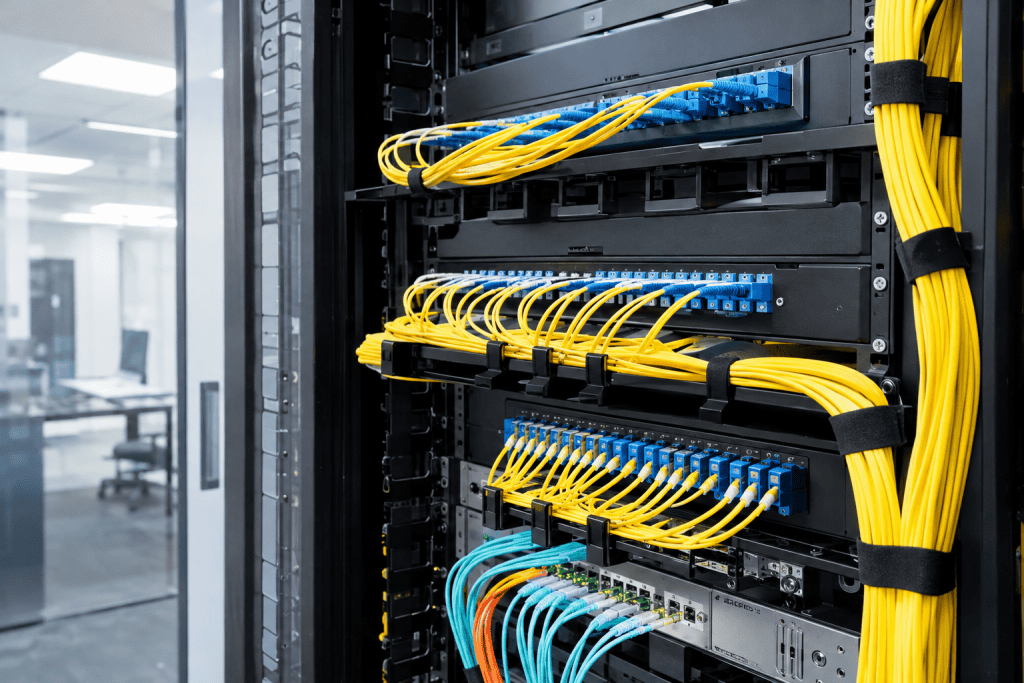
6. Consider Fibre Optic Cabling for Higher-Capacity Connectivity
As businesses become more dependent on digital systems, their communications infrastructure may need to support increasing data volumes and faster connections.
Fibre optic cabling can be an important part of this infrastructure, particularly where longer cable distances or higher-capacity connections are required.
Where fibre optic cabling can help
Fibre may be suitable for:
- Connecting separate buildings across a commercial site.
- Linking communications rooms on different floors.
- Supporting high-capacity network connections.
- Connecting warehouses, offices and operational facilities.
- Providing infrastructure for future network expansion.
Plan for long-term connectivity
The suitability of fibre depends on the property’s layout, network requirements and available equipment.
Businesses planning new developments or major upgrades should consider whether fibre should form part of the initial communications design rather than being added later.
7. Integrate CCTV and Security Infrastructure Early
Security is an important consideration for growing businesses, particularly those operating warehouses, retail premises, offices and industrial facilities.
Modern CCTV systems increasingly rely on network connectivity to transmit footage, support remote monitoring and integrate with other security technologies.
Why early planning is important
Installing cameras after a building has been completed can create additional cabling challenges.
Some locations may be difficult to access, while exposed cable runs can affect the appearance and protection of the installation.
Coordinate security with communications infrastructure
Plan camera locations, network connections, equipment cabinets and power requirements during the early design stages.
Consider future expansion, recording requirements and how the CCTV system will connect with the wider network.
Businesses may also benefit from coordinating CCTV with access control and alarm systems to create a more integrated security environment.
8. Prepare for Access Control and Smart Building Technology
Access control systems allow businesses to manage who can enter particular areas of a property.
Depending on the installation, these systems may use electronic access cards, keypads, mobile credentials or other authorised entry methods.
As businesses expand, managing access through traditional keys can become increasingly difficult.
Support changing workplace requirements
A growing business may introduce additional staff, contractors, restricted work areas or multiple office locations.
Electronic access control can make it easier to manage permissions and update access arrangements when personnel or operational requirements change.
Consider integration opportunities
Access control can potentially be integrated with CCTV, alarms and other building technologies.
Planning the required cabling, network connections and equipment locations early can make future integration easier and reduce the need for additional installation work.
9. Allow for Backup Power and Communications Continuity
Communications infrastructure is only useful when it has a reliable power supply.
A power outage can affect internet connectivity, phone systems, security cameras, access control and other essential business services.
For some businesses, losing these systems can interrupt operations and create security concerns.
Identify critical communications equipment
Consider which systems need to remain operational during a power interruption.
This may include network switches, routers, security equipment, servers and essential communications devices.
Consider appropriate backup solutions
Depending on business requirements, solutions may include uninterruptible power supplies (UPS), backup generators or other suitable power arrangements.
A UPS can provide temporary backup power to connected equipment, while a generator may support longer interruptions when appropriately designed and installed.
Businesses should assess their operational priorities and work with qualified professionals to determine an appropriate backup strategy.
10. Prioritise Cable Management, Labelling and Documentation
Cable management may seem like a minor detail during construction, but it can have a significant impact on the long-term performance and maintainability of communications infrastructure.
Poorly organised cabling can make it difficult to identify connections, troubleshoot faults and complete future upgrades.
Why documentation saves time
A well-documented installation should make it easier to understand where cables run, which outlets connect to particular network equipment and how different systems are configured.
This is particularly important for larger commercial properties with multiple communications cabinets, floors or buildings.
Establish good practices from day one
Use consistent labelling, organised cable pathways and suitable documentation.
Where applicable, ensure structured cabling is tested and the required results and installation records are provided.
These simple decisions can make ongoing maintenance more efficient and reduce confusion when additional contractors or IT professionals work on the network.
11. Build Cybersecurity and Physical Security Into the Design
Communications infrastructure is not just about connecting devices. It also plays an important role in protecting business information and physical assets.
An insecure network or poorly controlled communications room can create unnecessary risks.
Protect network equipment
Communications cabinets and equipment rooms should have appropriate physical access restrictions.
Limiting access to authorised personnel can help protect critical infrastructure from accidental damage, unauthorised changes or interference.
Coordinate with IT security specialists
Network security measures may include firewalls, secure wireless configurations, strong authentication, network segmentation and regular software updates.
Electrical and communications contractors can help establish the physical infrastructure, while IT specialists can configure and manage the associated cybersecurity controls.
Treating these requirements as part of the original project can help businesses avoid expensive changes later.
12. Work With Experienced Electrical and Communications Professionals
The success of a communications infrastructure project depends on more than selecting the right equipment.
Proper planning, installation, coordination and testing are all important to achieving a reliable result.
Why professional coordination matters
A commercial fit-out or infrastructure upgrade may involve builders, electricians, IT specialists, security contractors and other trades.
If communications requirements are not clearly defined, installation conflicts and delays can occur.
For example, data outlets may be positioned incorrectly, cable pathways may clash with other services or communications equipment may not have adequate space and power provisions.
Plan the project as a complete system
Engage relevant professionals early to review the building layout, business requirements and anticipated future growth.
Confirm the scope of work, installation responsibilities, testing requirements and handover documentation before the project begins.
Taking a coordinated approach can help create infrastructure that is easier to maintain, expand and adapt as business requirements change.
Speak to Spectra Electrical About Commercial Communications Infrastructure
Reliable communications infrastructure is essential for businesses that depend on technology, connectivity and secure operations.
From structured data cabling and network infrastructure to CCTV, access control and integrated electrical services, planning these systems correctly can help businesses create a more efficient and adaptable workplace.
Spectra Electrical & Communications provides electrical, communications and security services across Sydney, supporting commercial projects with services including communications cabling, CCTV, access control and electrical infrastructure.
To discuss your next commercial fit-out, communications upgrade or new building project, contact Spectra Electrical on 1300 665 587 or visit spectraelectrical.com.au.
Conclusion
As businesses grow, their communications infrastructure needs to grow with them. Decisions made during the early planning stages can have a lasting impact on connectivity, security, operational efficiency and future expansion.
By investing in structured cabling, scalable network equipment, reliable wireless coverage, fibre connectivity and properly planned security systems, businesses can create an infrastructure that supports their current operations while preparing for future demands.
The most effective approach is to treat communications infrastructure as an essential part of the overall building and business strategy, rather than an afterthought.
With careful planning and professional installation, growing businesses can reduce future disruption, avoid unnecessary upgrade costs and build a more reliable foundation for long-term success.
